Menu
UX Case Study
UX Case Study
Enhancing Onboarding and User Experience for Tempo Smart App
In this project, I improved the TempoSmart App, a diabetes management tool. My main tasks were designing new user flows, running A/B tests, and doing usabi...
In this project, I improved the TempoSmart App, a diabetes management tool. My main tasks were designing new user flows, running A/B tests, and doing usabi...
In this project, I improved the TempoSmart App, a diabetes management tool. My main tasks were designing new user flows, running A/B tests, and doing usabi...
Overview
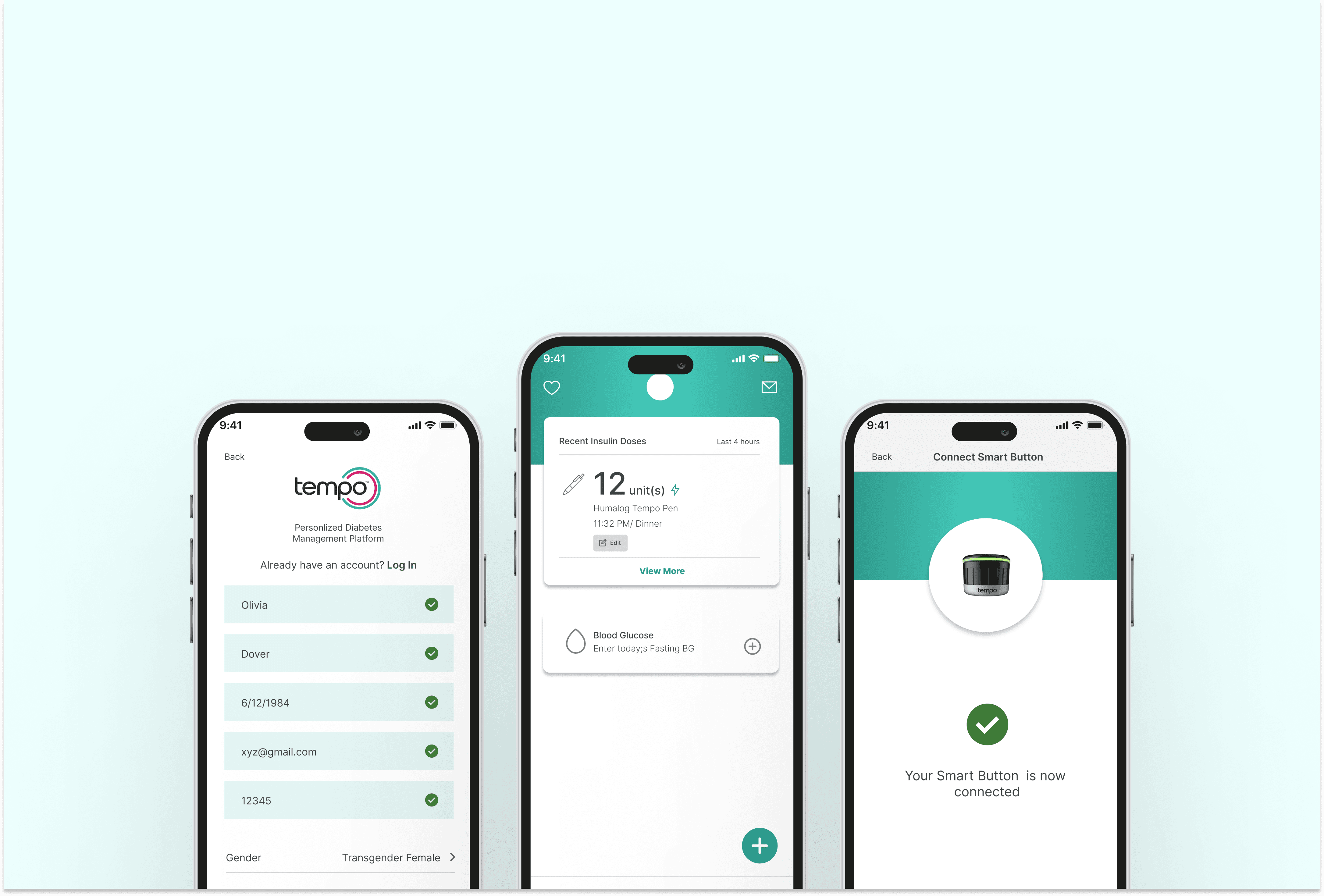
In this project, I improved the TempoSmart App, a diabetes management tool. My main tasks were designing new user flows, running A/B tests, and doing usability and UAT. I also provided post-launch support and collaborated with healthcare professionals and internal teams. These efforts helped solve key problems, save costs, and meet user and business needs.
Project Background
TempoSmart is a diabetes management app (SaMD) for adults with type 1 or type 2 diabetes. It provides real-time guidance and support, allowing users to share their health data with healthcare providers between office visits. Users can manually enter data or sync devices, get coaching, and receive reminders to help manage their diabetes better.
My Role & Responsibilities
Designing new user flows.
Conducting A/B testing.
Performing usability testing and UAT (User Acceptance Testing).
Providing post-launch product care.
Enhancing and improving existing user flows.
Collaborating with doctors, developers, and other stakeholders.
Tools
Notion, Figjam, Figma
Timeline
Sep 2023 - Mar 2024
Disclaimer: The data presented in this case study is protected and only specific parts of the TempoSmart™ application are shown to demonstrate skills. This information is for educational purposes only and should not be harmed or misused.
How Tempo Smart App works with the other components of the Product
The Tempo system includes:
Tempo Pen: Delivers insulin.
Tempo Smart Button: Transfers insulin dose data to the TempoSmart app.
TempoSmart App: Stores and analyzes health data, provides coaching, and sends medication reminders.
Tempo Insights: A web portal for healthcare providers to monitor patient data.
Key Challenges and Solutions
Problem Statement
Users had trouble with the pairing process due to unclear instructions, leading to incomplete data sharing. The complex and unclear process led to many users failing to complete the pairing.
UX Audit Problems
Lack of visibility on data sharing status
Not enough educational content for device connection
No progress indication during onboarding
Read the full case study by clicking below
Overview
In this project, I improved the TempoSmart App, a diabetes management tool. My main tasks were designing new user flows, running A/B tests, and doing usability and UAT. I also provided post-launch support and collaborated with healthcare professionals and internal teams. These efforts helped solve key problems, save costs, and meet user and business needs.
Project Background
TempoSmart is a diabetes management app (SaMD) for adults with type 1 or type 2 diabetes. It provides real-time guidance and support, allowing users to share their health data with healthcare providers between office visits. Users can manually enter data or sync devices, get coaching, and receive reminders to help manage their diabetes better.
My Role & Responsibilities
Designing new user flows.
Conducting A/B testing.
Performing usability testing and UAT (User Acceptance Testing).
Providing post-launch product care.
Enhancing and improving existing user flows.
Collaborating with doctors, developers, and other stakeholders.
Tools
Notion, Figjam, Figma
Timeline
Sep 2023 - Mar 2024
Disclaimer: The data presented in this case study is protected and only specific parts of the TempoSmart™ application are shown to demonstrate skills. This information is for educational purposes only and should not be harmed or misused.
How Tempo Smart App works with the other components of the Product
The Tempo system includes:
Tempo Pen: Delivers insulin.
Tempo Smart Button: Transfers insulin dose data to the TempoSmart app.
TempoSmart App: Stores and analyzes health data, provides coaching, and sends medication reminders.
Tempo Insights: A web portal for healthcare providers to monitor patient data.
Key Challenges and Solutions
Problem Statement
Users had trouble with the pairing process due to unclear instructions, leading to incomplete data sharing. The complex and unclear process led to many users failing to complete the pairing.
UX Audit Problems
Lack of visibility on data sharing status
Not enough educational content for device connection
No progress indication during onboarding
Read the full case study by clicking below
Overview
In this project, I improved the TempoSmart App, a diabetes management tool. My main tasks were designing new user flows, running A/B tests, and doing usability and UAT. I also provided post-launch support and collaborated with healthcare professionals and internal teams. These efforts helped solve key problems, save costs, and meet user and business needs.
Project Background
TempoSmart is a diabetes management app (SaMD) for adults with type 1 or type 2 diabetes. It provides real-time guidance and support, allowing users to share their health data with healthcare providers between office visits. Users can manually enter data or sync devices, get coaching, and receive reminders to help manage their diabetes better.
My Role & Responsibilities
Designing new user flows.
Conducting A/B testing.
Performing usability testing and UAT (User Acceptance Testing).
Providing post-launch product care.
Enhancing and improving existing user flows.
Collaborating with doctors, developers, and other stakeholders.
Tools
Notion, Figjam, Figma
Timeline
Sep 2023 - Mar 2024
Disclaimer: The data presented in this case study is protected and only specific parts of the TempoSmart™ application are shown to demonstrate skills. This information is for educational purposes only and should not be harmed or misused.
How Tempo Smart App works with the other components of the Product
The Tempo system includes:
Tempo Pen: Delivers insulin.
Tempo Smart Button: Transfers insulin dose data to the TempoSmart app.
TempoSmart App: Stores and analyzes health data, provides coaching, and sends medication reminders.
Tempo Insights: A web portal for healthcare providers to monitor patient data.
Key Challenges and Solutions
Problem Statement
Users had trouble with the pairing process due to unclear instructions, leading to incomplete data sharing. The complex and unclear process led to many users failing to complete the pairing.
UX Audit Problems
Lack of visibility on data sharing status
Not enough educational content for device connection
No progress indication during onboarding